
Use CarPlay with a shared mobile connection
How to use wired CarPlay while sharing an iPhone's mobile data connection with the Audi Q6 e-tron.
Wireless CarPlay uses the phone’s Wi-Fi connection to communicate with the car. This prevents the phone from simultaneously acting as the Wi-Fi hotspot that supplies data to the MMI.
The practical solution is to connect the iPhone with a USB cable. CarPlay then runs over USB, while the phone can share its mobile connection with the car over Wi-Fi. This allows online services in the MMI, such as the Vivaldi browser, to use the phone’s data allowance instead of the car’s included mobile-data quota.
The example below shows TIDAL running through CarPlay while a video is open in Vivaldi. The two sources cannot play audio simultaneously, but both can use the phone’s data connection.
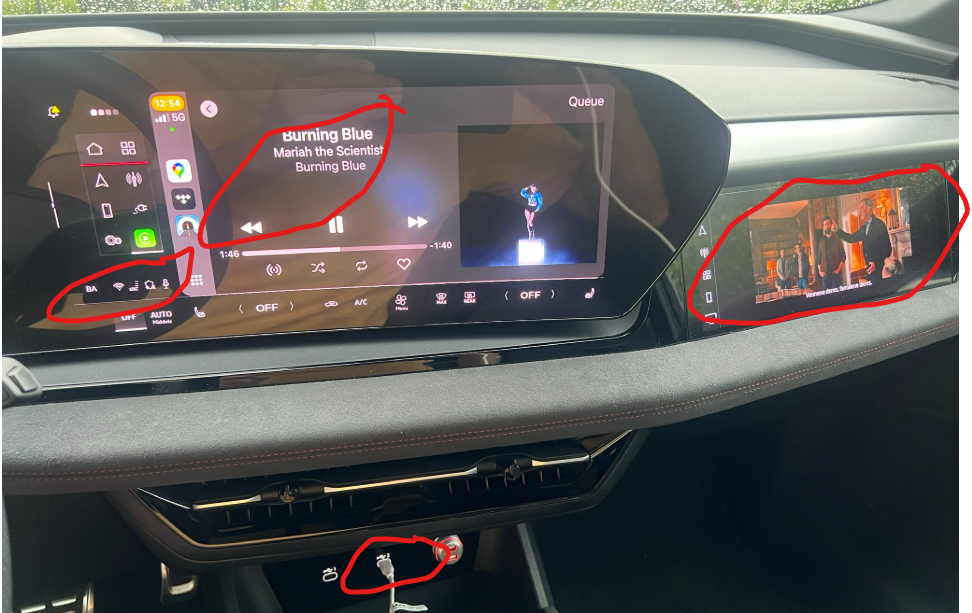
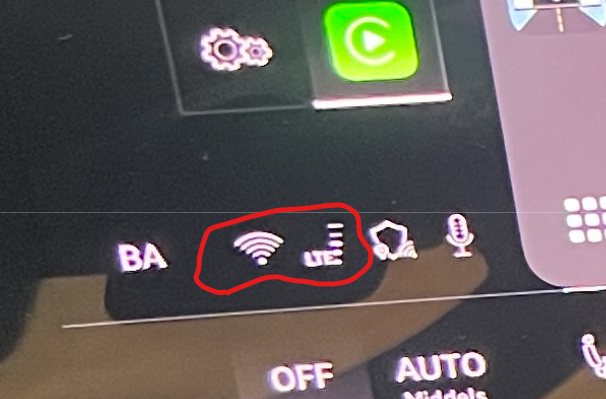
The network symbol shown at the left of the highlighted area indicates that the car is using a Wi-Fi uplink.
USB can also provide better and more consistent audio quality than a wireless CarPlay connection. See this detailed article about Apple CarPlay and Audi e-tron for further background.